> ## Documentation Index
> Fetch the complete documentation index at: https://target-calculator-docs.ha-consultancy.com/llms.txt
> Use this file to discover all available pages before exploring further.
# Create a Target Configuration
> Create a Target Configuration in Business Central by choosing the source table, grouping field, value field, and calculation period to measure.
# Create a Target Configuration
A **Target Configuration** describes *what* to measure and *over which period*.
## Open a new card
1. On the **Target Configurations** page, choose **New**.
2. The **Target Configuration** card opens.
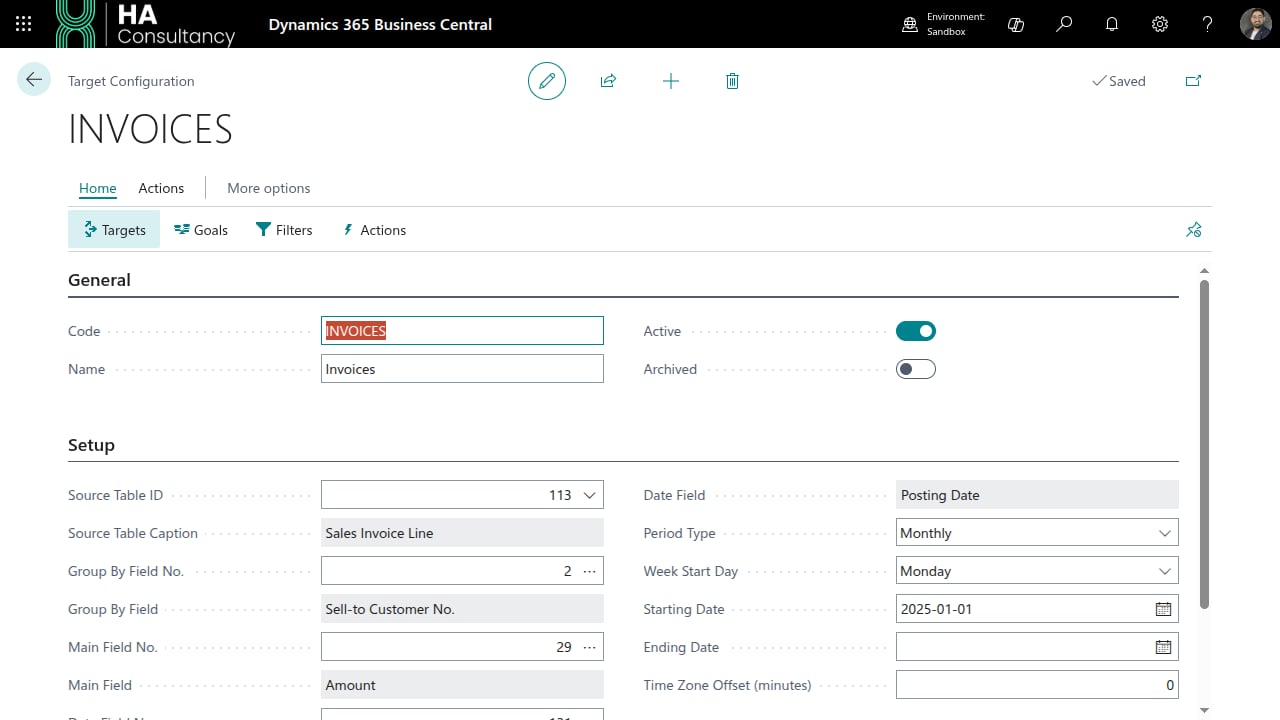 ## General
| Field | What to enter |
| ------------ | ------------------------------------------------------------------ |
| **Code** | A unique code for this configuration (e.g. `SALES-2026`). |
| **Name** | A descriptive name (e.g. `2026 Monthly Sales by Salesperson`). |
| **Active** | Turn on when you want the Job Queue to process this configuration. |
| **Archived** | Turn on to retire a configuration without deleting it. |
## Setup
This section tells the engine where to read data and how to slice it.
## General
| Field | What to enter |
| ------------ | ------------------------------------------------------------------ |
| **Code** | A unique code for this configuration (e.g. `SALES-2026`). |
| **Name** | A descriptive name (e.g. `2026 Monthly Sales by Salesperson`). |
| **Active** | Turn on when you want the Job Queue to process this configuration. |
| **Archived** | Turn on to retire a configuration without deleting it. |
## Setup
This section tells the engine where to read data and how to slice it.
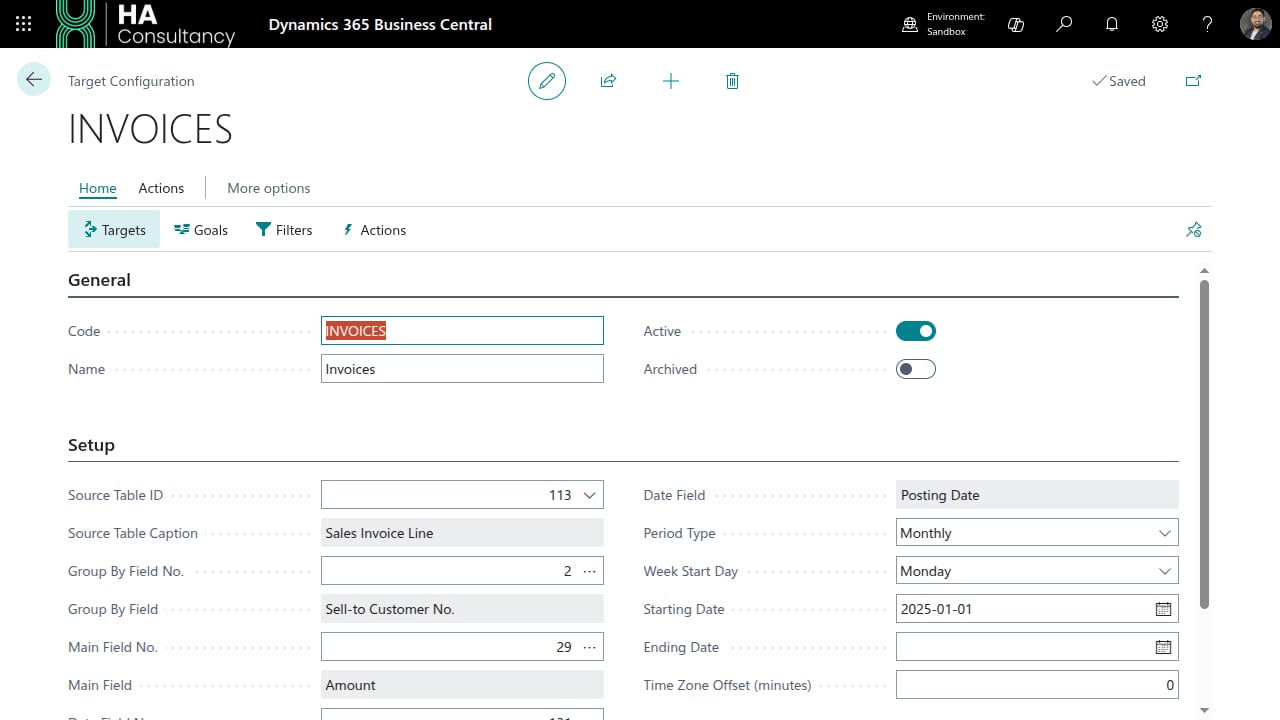 | Field | What to enter |
| ------------------------------ | ----------------------------------------------------------------------------------------------------------- |
| **Source Table ID** | The BC table to read records from. Use the lookup to pick any table (e.g. *Sales Invoice Line*). |
| **Group By Field No.** | The field that defines each group (e.g. *Salesperson Code*). One result row is produced per distinct value. |
| **Main Field No.** | The numeric field that is summed per group (e.g. *Amount* or *Line Amount*). |
| **Date Field No.** | The date or datetime field used to keep only records inside the period (e.g. *Posting Date*). |
| **Period Type** | *Daily*, *Weekly*, *Monthly*, *Quarterly*, or *Yearly*. |
| **Week Start Day** | Only used when *Period Type* is *Weekly*. |
| **Starting / Ending Date** | The window during which this configuration is effective. |
| **Time Zone Offset (minutes)** | Offset from UTC for datetime fields (e.g. `180` for UTC+3). |
> Each field uses a **picker** - choose the lookup arrow to select from the actual fields
> of the source table. The captions next to each field confirm your selection.
## Options
| Field | Effect |
| ------------------------------ | ------------------------------------------------------------------- |
| **Allow Goal % Override** | Lets users manually override the calculated goal percentage. |
| **Override Requires Approval** | When override is allowed, requires approval before it takes effect. |
| **Posting Requires Approval** | The result must be approved before action plans can be posted. |
Once the source and period are set, define the building blocks:
[targets, goals, filters & actions](./03-targets-goals-filters-actions.mdx).
| Field | What to enter |
| ------------------------------ | ----------------------------------------------------------------------------------------------------------- |
| **Source Table ID** | The BC table to read records from. Use the lookup to pick any table (e.g. *Sales Invoice Line*). |
| **Group By Field No.** | The field that defines each group (e.g. *Salesperson Code*). One result row is produced per distinct value. |
| **Main Field No.** | The numeric field that is summed per group (e.g. *Amount* or *Line Amount*). |
| **Date Field No.** | The date or datetime field used to keep only records inside the period (e.g. *Posting Date*). |
| **Period Type** | *Daily*, *Weekly*, *Monthly*, *Quarterly*, or *Yearly*. |
| **Week Start Day** | Only used when *Period Type* is *Weekly*. |
| **Starting / Ending Date** | The window during which this configuration is effective. |
| **Time Zone Offset (minutes)** | Offset from UTC for datetime fields (e.g. `180` for UTC+3). |
> Each field uses a **picker** - choose the lookup arrow to select from the actual fields
> of the source table. The captions next to each field confirm your selection.
## Options
| Field | Effect |
| ------------------------------ | ------------------------------------------------------------------- |
| **Allow Goal % Override** | Lets users manually override the calculated goal percentage. |
| **Override Requires Approval** | When override is allowed, requires approval before it takes effect. |
| **Posting Requires Approval** | The result must be approved before action plans can be posted. |
Once the source and period are set, define the building blocks:
[targets, goals, filters & actions](./03-targets-goals-filters-actions.mdx).